
Workforce Management in Jira Service Management

The feature I was most excited to see Atlassian add to Jira Service Management this year has to be Workforce Management.
For too long, teams have relied on manually assigning work or the brute-force auto-assignment options within Jira Automation.
Instead, Workforce Management takes into account real-time capacity, availability, shift patterns, part-time working, holidays and absence, so requests can be routed to the right person at the right time.

Why use Workforce Management?
As service teams grow, managing work manually becomes increasingly difficult. Common challenges include:
Agents working different shifts or time zones.
Uneven distribution of work across the team.
Difficulty knowing who is available to take new requests.
Manual ticket assignment consuming valuable management time.
Managing planned and unplanned absence.
Key features
1. Capacity management
Each agent can have a defined workload capacity, allowing Jira to understand how much work they can realistically handle. Rather than assigning tickets equally, Workforce Management considers how busy each agent already is.
2. Shift scheduling
Managers can create and maintain staff schedules directly within Jira, or import existing schedules via CSV. Schedules can include:
Standard working hours
Rotating shifts
Part-time working patterns
Public holidays
Planned leave
Multiple time zones
3. Agent availability
Agents can indicate whether they are currently available to receive work. Unavailable agents are automatically excluded from intelligent work assignment until they become available again.
Availability considers situations such as:
Lunch breaks
Training sessions
Team meetings
Annual leave
Sick leave
4. Intelligent ticket routing
Traditional assignment rules typically rely on static automation. Workforce Management takes additional information into account, including:
Current workload
Remaining capacity
Shift schedules
Team membership
Availability status
5. Workforce dashboard
Managers have access to a live operational dashboard showing:
Agents currently on shift
Agents who are unavailable
Current workload across the team
Remaining capacity
Staffing coverage
How to set up Workforce Management
Enabling Workforce Management
Create teams in Jira, up to 15 per space.
Enable the Workforce feature in Settings > Features > Workforce Management.

Go to Settings > Workforce, connect the selected teams and select Enable Workforce Management.
Set the default Routing Rules, including availability, capacity and auto-assignment.
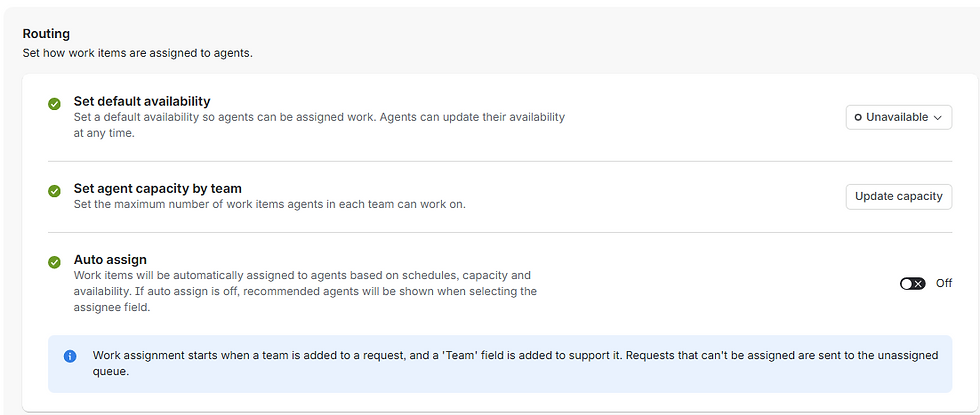
Assignment
With Auto assign turned off, Workforce will suggest assignees in the Assignee field.

With Auto assign turned on, Workforce will automatically assign work based on the setup provided when the Team field is populated. This can be achieved via automation or by setting the Team field manually.
Coordinating schedules
From the sidebar, select Workforce > Schedules.

Select Create or Import to add a schedule.

Complete the schedule details. Each schedule needs to belong to a team, but you can select individual members of that team for each schedule. Schedules can be set to recur.

Schedules can be reviewed on the main screen, where you can toggle between a team view and an individual view.

Monitoring capacity
From the sidebar, select Workforce > Capacity utilization.

Review agent utilisation on the main screen.

Rebalance team or individual workloads in response to current agent utilisation.
Managing availability
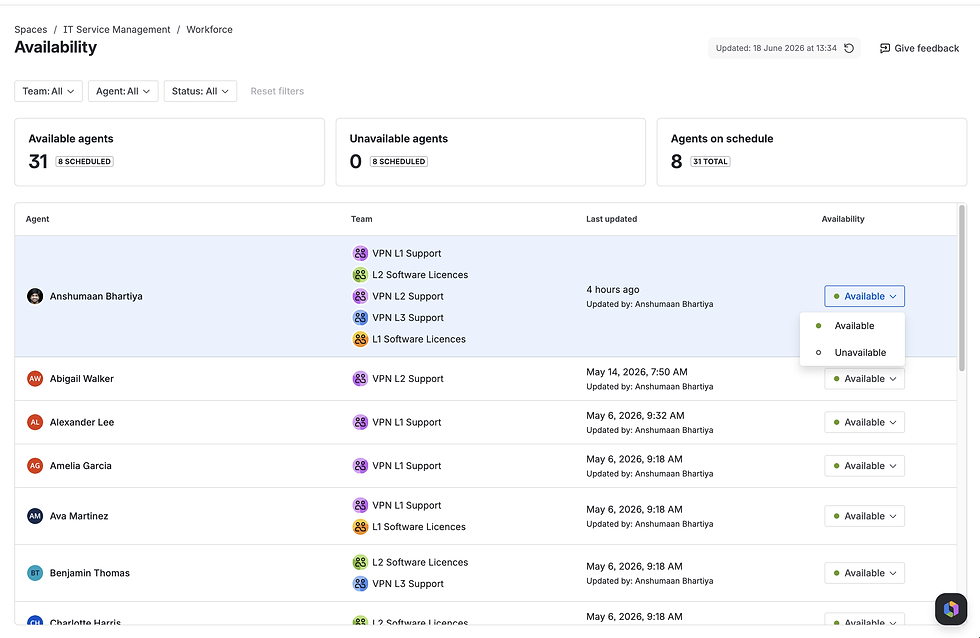
From the sidebar, select Workforce > Availability.

Individual agents can be set as Available or Unavailable, depending on business needs.
Ready to optimise your assignment rules and capacity planning?
Stop relying on static round-robin or manual allocation. We can help you design intelligent assignment rules in Jira Service Management that adapt dynamically to agent availability, skills and current workloads.

Comments