
Confluence Roles - A Practical Guide

Why Roles matter
Confluence Roles represent the biggest evolution in Confluence permissions and governance since the move to Confluence Cloud.
As Confluence Roles become available from July through September 2026, we take the chance to go through the changes and the impacts on Confluence.
Confluence Roles will significantly simplify Confluence governance. Instead of configuring individual permissions for every user in every space, admins will be able to assign reusable roles that automatically grant the appropriate level of access.
What are roles in Confluence?
A Confluence Role is a predefined set of permissions that determines what a user can do within a space. Rather than managing permissions individually, administrators assign users or groups to a role that matches their responsibilities—for example, Viewer, Contributor, or Space Administrator.
This new approach makes permissions easier to understand, faster to manage, and more consistent across spaces, simplifying the administration of space permissions and helping organisations strengthen governance while reducing administrative overhead. You avoid creating one-off permission models for every space and make it clearer who should have access, who can contribute, and who is responsible for administration.
Confluence includes a set of Default Roles that cover the most common access levels, but also allows the creation of Custom Roles for when these don’t fit your organisational model:
Default roles
Viewer: can read content and follow updates, but does not contribute changes.
Commenter: can view and add comments, useful for stakeholders who need to review or provide feedback.
Contributor: can create and edit content, supporting day-to-day collaboration.
Admin (space): can manage the space, including settings, people, permissions, and content administration.
For example, you might be a Viewer in a company-wide announcements space, a Contributor in two project spaces, and a Space admin in the team space you own. The role changes by space, but the meaning of each role stays consistent.
Custom roles can be useful when the default roles do not quite match your operating model, but use them carefully. Keep the role set small, name roles clearly, and avoid creating tiny variations for individual spaces. Confluence also limits the number of custom roles, so treat them as part of your governance model rather than a shortcut for every exception.
What a Confluence admin needs to do
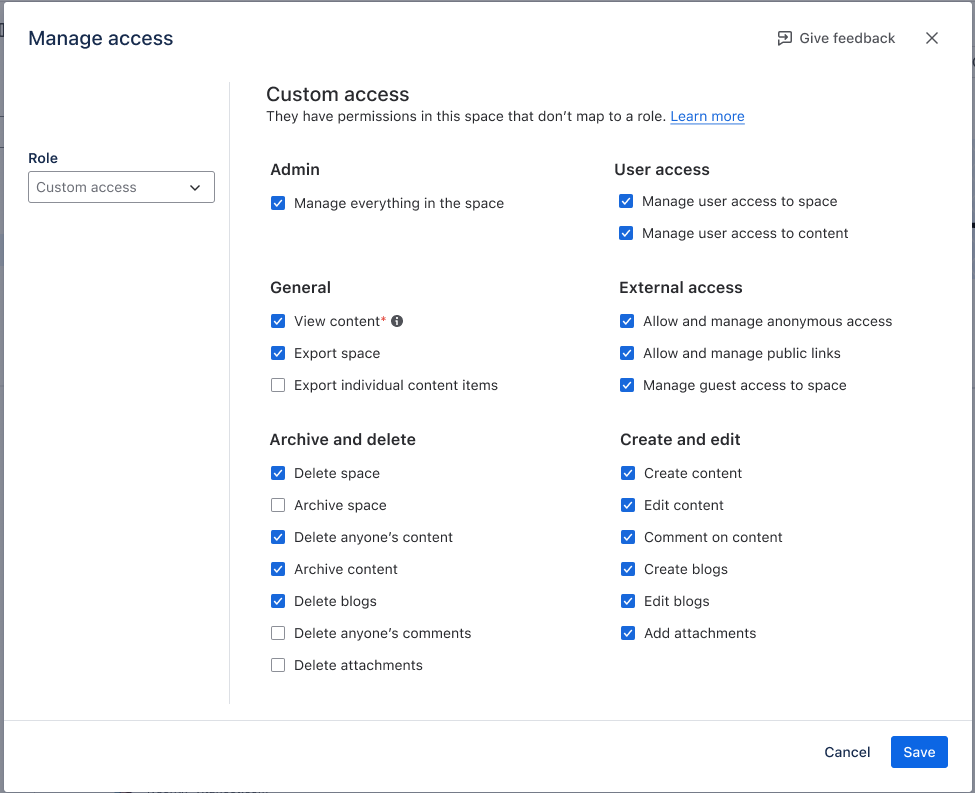
In the immediate term - Nothing. Existing permissions will be rolled into a ‘Custom Access’ role, which means no permissions will change overnight.
In the longer term….
Agree what Roles are needed
The default roles will be suitable for most companies, but you can create up to 10 custom RolesYou can select from the following permissions:
Admin
Manage everything in the space
User access
Manage user access to space
Manage user access to content
General
Export space
Export individual content items
External access
Allow and manage anonymous access
Allow and manage public links
Manage guest access to space
Archive and delete
Delete space
Archive space
Delete anyone’s content
Archive content
Delete blogs
Delete anyone’s comments
Delete attachments
Create and edit
Create content
Edit content
Comment on content
Create blogs
Edit blogs
Add attachments
Create New Roles (optional)
You only need to do this if the default roles are not suitable
Go to Confluence settings > Permissions > Space roles.
Select Create custom role.
Give the role a clear name and description, for example “Knowledge Base Publisher” rather than “Advanced User”.
Select the permissions the role should include. Start from the minimum needed: view, comment, create, edit, delete, export, or administration permissions where appropriate.
Select Save.
Add Roles to Spaces
It’s best to select a Space for a Pilot Project, before rolling out globally
Open the space you want to update.
Go to Space settings > Users.
Select ‘Add People’.
Search for the User(s) and/or Group(s) you want to add to a Role.
Select Save.


Ready to simplify your Confluence governance?
Confluence Roles provide a powerful new way to manage permissions consistently across your organisation but implementing the right governance model requires careful planning.
As an Atlassian Platinum Solution Partner, Sourcesense International helps organisations design scalable permission models, optimise Confluence administration, and get the most from Atlassian Cloud.
Whether you're preparing for Confluence Roles or looking to improve your existing governance, our experts are here to help.
Get in touch with our team to discuss your Confluence strategy.


Comments